Calendar Sync (iCal)
iCal sync passes availability between calendars. It is helpful, and it has limits that will cost you a booking if you ignore them.
#Before you start
- A bookable lodging or private-water listing that is enabled for you. See Booking Products.
- One product per rental listing or unit. The custom Channel Manager plugin treats one product as one unit.
- Your Airbnb and Vrbo calendar export URLs.
#Steps
- In Airbnb and Vrbo, copy each platform's calendar export URL.
- Open iCalendars in your vendor dashboard, where available to your account. Import each export URL into the matching product. Use the URLs, not a downloaded one-time .ics file.
- Copy the live export URL for your website listing and add it to each platform as an imported calendar.
- Connect Airbnb and Vrbo directly to each other as well.
- Check the sync status: last success, next import and any errors.
- Make a test block on one platform and confirm it appears where expected, allowing for the timing below.
#Example: one cabin on three calendars
One product, three calendars, and the pairings that matter:
Cabin on Airbnb, Vrbo and the website. The website imports both. Each platform imports the website export. Airbnb and Vrbo are also linked to each other, because the website will not pass an Airbnb reservation to Vrbo.
#Critical: imports are not re-exported
Imported reservations are not re-exported. The website is not an aggregator that forwards Airbnb reservations to Vrbo. Link Airbnb and Vrbo directly to each other too.
#Timing
- The plugin describes imports refreshing about every 15 minutes. This is intended timing, not a guaranteed interval. Routine imports do not require Sync now when your listing has a scheduled import and WordPress scheduled events are being triggered.
- WP-Cron depends on site traffic to fire, so timing is approximate. If it is disabled, hosting-level cron is needed.
- Exports are generated on request. Airbnb and Vrbo pull on their own schedules. Airbnb currently documents imported calendars refreshing about every three hours; Vrbo documents 30-minute synchronisation.
#What is and is not synced
- Availability only. Not rates, payments, guest data, resources or capacity.
- Booking checks look at all blocks in a stay, not only the start.
- If an import fails, the last good blocks are kept. Cancelled dates are released on the next successful refresh.
- There is no real-time double-booking guarantee.
#Where the controls are
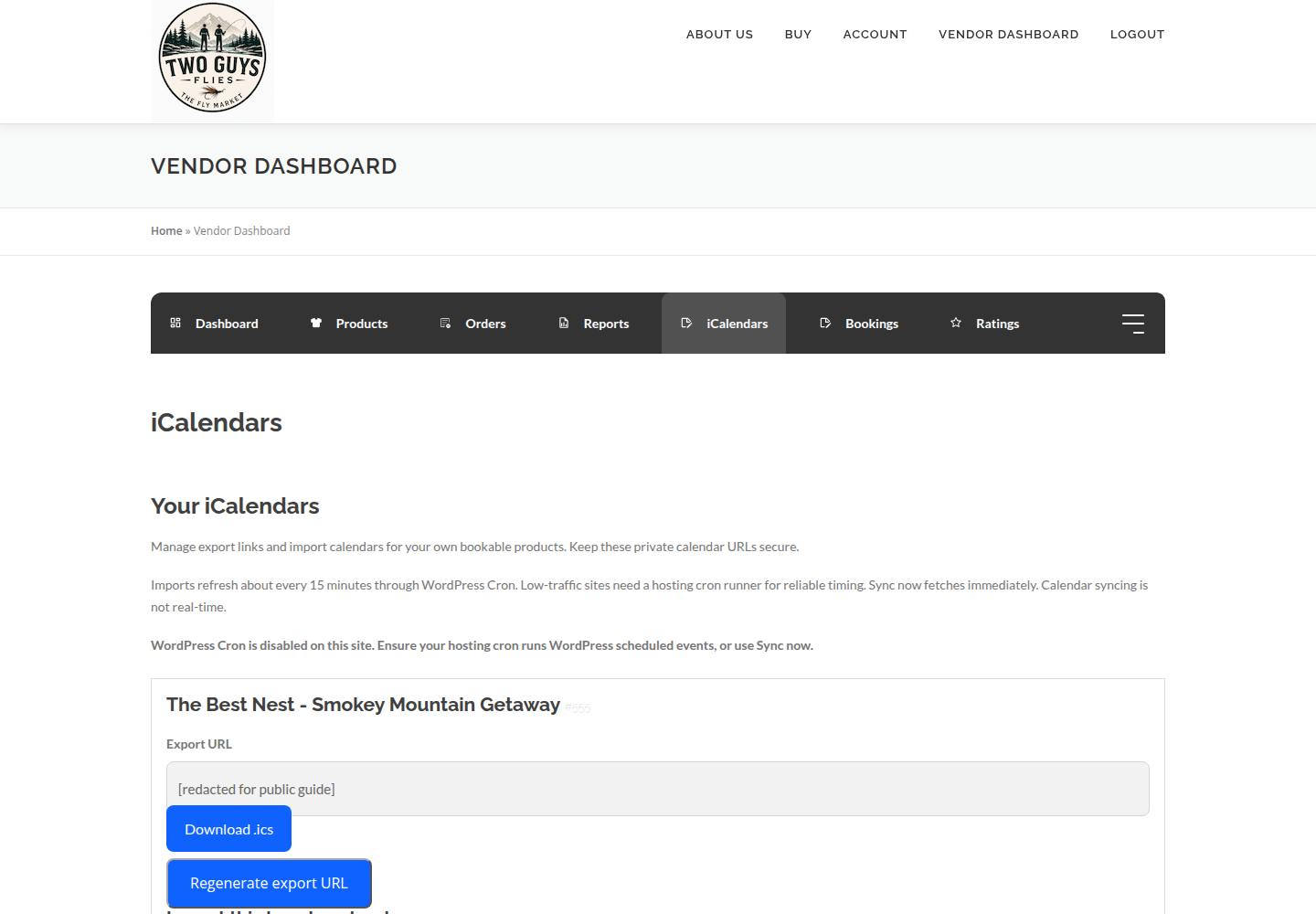
In the vendor dashboard, open iCalendars. For each product it shows an export URL, a Download .ics option, Regenerate export URL, and Import third-party calendars. Only regenerate the export URL if you mean to: platforms using the old URL will stop receiving updates.
#Check automatic imports
Use your listing’s last attempt, last successful sync, next scheduled import and any errors to check its status. Sync now requests an immediate fetch; it is not needed for routine imports when scheduling is working.
A “WordPress Cron is disabled” warning does not by itself mean imports have stopped: a hosting runner can trigger scheduled events instead. The Channel Manager import event and the hosting runner both need to be working. If your listing shows “Not scheduled,” or its last attempt stays unchanged beyond the expected refresh interval, contact marketplace support. Do not regenerate export URLs to fix scheduling.
#Do not rely on a downloaded file
Download .ics produces a one-time snapshot. Use the live URLs for ongoing sync.
#Troubleshooting
A cancelled stay is still blocked.
Wait for the next successful import from the source, and confirm the source calendar released it.
Sync never runs.
Check last attempt, last success and next scheduled import. If the next import is “Not scheduled,” ask the marketplace to inspect the Channel Manager event and hosting runner separately. Do not regenerate export URLs as a scheduling fix.
Airbnb booking did not reach Vrbo.
Expected. Link those two directly.
Shared-capacity listing double-booked.
One-unit iCal does not support shared capacity or resources.
#Final checklist
Your ticks are saved in this browser only.
#Screenshots